
What if you could capture sound from every direction with a single microphone and decide where to aim your microphones after you've finished recording?
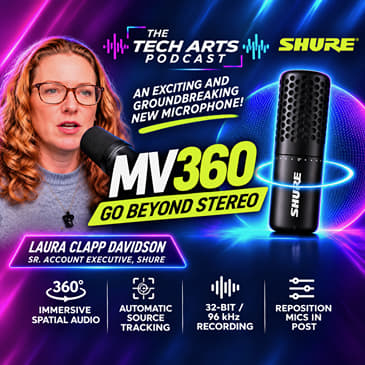
In this segment of The Tech Arts Podcast, we're joined by Laura Clapp Davidson, Senior Account Executive at Shure, to explore the new **Shure MV360 Spatial Audio Microphone**.
This compact USB-C microphone brings immersive 360-degree spatial audio within reach of content creators, filmmakers, musicians, and church production teams.
With automatic source tracking, binaural audio, 32-bit/96kHz recording, and the ability to position virtual microphones in post-production, the MV360 opens up an entirely new world of creative possibilities.
Imagine capturing the atmosphere of a live worship experience, gathering audio for a behind-the-scenes video, or creating immersive content directly from your smartphone.
Join us as we explore the technology behind the MV360, what makes it unique, and how it could change the way you capture and experience sound.
All episodes can be found at techartspodcast.com
#Shure #MV360 #SpatialAudio #ImmersiveAudio #TechArtsPodcast #ChurchTech #AudioProduction #ContentCreation #Filmmaking #ProAudio
[00:00:00] Today on the podcast, we're joined by an exciting guest from Shure. She's a talented musician, singer, podcaster, and technology specialist who bridges the gap between music and tech. A Berklee College of Music graduate with expertise in professional audio, songwriting, and digital marketing, she brings a unique perspective to the industry. Please welcome to the Tech Arts Podcast, Laura Clapp-Davidson. Hey, Laura. Hey, David.
[00:00:26] All right, let's talk the Shure MV360. I was reading about this microphone and wanted to get you on to talk about it because a lot of churches capture a podcast or announcements, essentially a non-live aspect of their service that rely on a volunteer to understand mic placement or require specialized micing. How does this brand new microphone change the ballgame when it comes to these type of recordings?
[00:00:52] Yeah, great question. It doesn't just change the ballgame. It completely revolutionizes it. Reason being, with the MV360, you can actually capture your sound and then in post-production, tweak it.
[00:01:05] So if you have no concept of how to use a microphone, where to place it, we can help you with that. Essentially, if you put it in what's called up orientation and put it in binaural mode, binaural means it's going to listen like we listen as humans and give you space, depth, the full audio picture for you to then manipulate in post-production and live as well. But it's really just a game changer.
[00:01:32] Let's talk a little bit about, I was reading about the 360 degree spatial audio. Yes. And most of us are used to microphones just capturing sound from a specific direction, but the MV360 captures an entire 360 degree sound field with a single mic. It's kind of what you were just talking about, but explain what makes that technology unique and how does it change what's possible for creators and audio engineers?
[00:01:58] Yeah, it's not new technology, but what we've done is put that technology into a microphone that can plug into your phone, which is crazy because traditionally, spatial audio microphones, in order to capture true 360 spatial audio, you need several microphones. You need to level match, you need to make sure their xy axis is just right, you need XLRs, you need all of these things. And then you need a decoder on the other side.
[00:02:25] Once you get that audio into your DAW, this has been completely removed from the equation. I can literally plug the MV360 into my phone and get 360 spatial audio that records as an AmbiX file and outputs as an AmbiX file so that I can put it into any DAW that I want because we have actually a plugin, a virtual mic editor plugin. Or you can just do it straight into the app and use the virtual mic editor. What does that mean?
[00:02:49] It means I can steer how those microphones are placed within that space, that 360 degree spatial audio field. So you can tilt the mics up, down, left, right. It's all virtually and it's, it's, I'm a little excited in case you can't tell. Yeah. Well, and especially with iPhone now and Android phones, they capture such great video. The ability to just plug this into the phone and go, I think it's a game changer, especially for your low budget.
[00:03:17] You know, I just got to get it on the fly kind of stuff, news gathering, announcements, gatherings, anything that churches do or even secular organizations do. I think this is a game changer for that. But talk to me about Capture Now Mix Later. What the heck is that talking about? Yes. So that's where you can put it into binaural mode, for example, capture the entire 360 field and then edit it later.
[00:03:43] So let's say, for example, you are in worship, you have the worship leader talking on the altar and then you have, you know, members of the congregation who are wanting to contribute or maybe they stand up and do a joy and concern or what have you. They're contributing to the conversation. Normally, if you didn't run a mic out to that member of the congregation, you were sunk.
[00:04:04] But now with the MV360, you're capturing the entire audio image so that you can then steer the lobe of this virtual microphone to that person in post-production. And there's also auto-tracking mode, which I know you're going to ask me about. So I'm going to skip ahead. I'm going to answer that because auto-tracking. You're just so excited. You're like jumping into all this stuff. I'm so excited.
[00:04:26] Because auto-tracking, now traditionally, I would recommend it for use in like a multi-talk podcast application because if you have, let's say, four people sitting around a table before you'd each have to have your own mics, now you can just put the MV360 in the middle and auto-tracking will shift the microphone, the active microphone lobe to capture that talker. Same idea if you're in worship. If you're in the middle of the sanctuary, it can adjust those lobes and track. And that comes from our conferencing side of things at Shure.
[00:04:55] So we've taken this wild, cool conferencing technology that goes into tracking speakers and conference applications and now made it for content creation, live streaming, and worship. So it's pretty exciting. Now let me ask you this. Is it easy to operate? And the reason why I'm asking you that is because it sounds like we've just eliminated the need for three, four microphones to do a project and brought it all down to one person, one microphone. So is it easy for that volunteer to operate?
[00:05:25] 100%. You literally go into the app or the virtual mic editor and select auto-tracking and it will do that automatically for you. It's just getting it placed properly and making sure that the orientation is set correctly. So we have three orientations, up, down, and side. So up is standing the microphone straight up. Down is hanging it upside down from like a boom pole or an arm.
[00:05:50] And side is kind of if you were using it on a digital SLR where you're pointing it more directionally at the source. So what's the difference between the MV360 and the MV360 Plus? Great question. So MV360 Plus is giving you wireless freedom and flexibility as well as onboard recording. So when I say that, you can actually put that up to 100 feet away. So if you are in the congregation, for example, if you're in front of house and you're at the back,
[00:06:18] you can put the MV360 Plus in the middle of the sanctuary and capture and monitor and control the microphone from 100 feet away on your phone, which is insane. But you can also plug it into a digital SLR because it has a three and a half millimeter out, which can either be headphones or microphone output to your camera.
[00:06:40] So are we getting to the point where someone can just walk into a room, set down one microphone and capture professional quality audio without an entire recording setup? We are. It's a very exciting time. I think a lot of jobs just got super easy. Oh, yes, they got easier. Yeah, I mean, look, churches are always trying to do things with one person.
[00:07:05] And I think what you guys have done here with this microphone is taken some of those post-recording setups and even some of the live applications that you talked about. But you've really made them easier for that one person to handle. You know, I know in the secular market, they have the money to have the three, four different people and do the podcast studios and things of that nature. But in the church market, it's one person doing like 15 things.
[00:07:29] And what I think this microphone has done is just simplified it to where, you know, you can record the 360 audio. You can pick the lobe after that. You know, oh, well, I missed them. So let me turn this up because this happened to be closer to them. It just feels like a game changer. It's a total game changer. And also, too, if you have audio that you captured that you maybe didn't want to capture.
[00:07:52] For example, I was at my daughter's choral concert two nights ago and captured their acapella performance where everyone was out in the auditorium with us. And the singers directly behind me didn't quite have their pitch where they needed it to be. And I've been able to go in and post and re-steer those lobes to make the choir sound full and not focus in on those two voices that were maybe not ready for primetime. It's really been cool.
[00:08:17] For more information on this microphone or all of the Shure products, please go to Shure.com. Or if you want a special deal, and I know all of you out there do, go to techartspodcast.com and click on the Shure logo. Again, that's techartspodcast.com and click on the Shure logo. Shure engineers passion into audio innovations that deliver flawless sound. Find out more at Shure.com.